


Gotham Sports
1.91.02K Reviews
App Specs
- Version
- 10.15.0
- Updated On
- License
- Free
- Downloads
- 100,000+
- Developer
- Gotham Advanced Media and Entertainment, LLC
- Categories
- Sports
- Platform
- Android
Screenshots
 Analysis by AppCompare
I see Gotham Sports as a focused idea with a clear appeal: bringing New York sports coverage together in one place. That can make following several local teams less scattered, especially if you want a single starting point on your phone rather than bouncing between team pages and general sports apps. My enthusiasm is tempered by the app’s mixed reception, though, so I’d approach it as a potentially useful hub rather than an automatic replacement for every sports source I already use.
What a New York sports hub can do well
The most convincing reason to try Gotham Sports is the convenience of having local fandom as the organizing principle. A broad sports app often gives every league and headline equal weight; a city-focused app can feel more relevant when your attention is split between teams from the same area. If you follow more than one New York side, having one place to check before a game or during a busy day is an appealing proposition.
That convenience is most valuable as a routine, not as a promise that you will never need another source. I’d use a regional app to orient myself, see what deserves attention, and keep local sports close at hand. For a deeper look at a particular matchup, a dedicated league app, a team’s own coverage, or a live broadcast may still be the better destination. The trade-off is straightforward: a local hub can reduce app-hopping, while specialist sources may serve a narrower need more directly.
A practical way to judge it is to ask whether it fits the teams you actually follow. Someone who keeps up with several New York clubs may get more from a single regional home than someone who cares about only one team and already has a dependable team app. If your sports interests are mostly outside the city, the local focus is less likely to justify adding another app.
How I would fit it into a game day
Picture a weekday when I’m away from the television and have only a few moments between errands. I would open the app to get a quick sense of what is happening in New York sports, then decide whether a game or story deserves more of my time. That quick-check role is different from settling in to watch a full game or reading a long analysis piece: the app earns its place if it helps me stay oriented without turning every spare minute into a search across multiple sources.
For that kind of use, I’d make the app part of a simple two-step routine. First, use it as the local check-in; then, if I need more detail, move to the source best suited to that question. A broadcast is the obvious choice for watching action, while a specialist source can be more appropriate when I want a narrow league or team focus. Keeping those roles separate makes a regional app useful without expecting it to do everything.
I’d also be selective about how much attention I give any sports app during the day. Checking whenever I have a spare moment can become distracting, particularly when several teams are active. A quick visit at a natural break is a better habit than repeatedly opening the phone to look for updates. The value here is in making local coverage easier to reach, not in keeping me permanently tuned in.
Worth Reading Before You Choose

EA SPORTS FC Mobile 26 Is a Bigger Football Game, but It Takes Time

Flipboard Shows What News Apps Must Do Beyond the Feed

Switching to Android Auto Means Rethinking Your Driving Routine

Google Calendar Makes a Crowded Week Easier to Manage

Ludo King Makes the Most of the Minutes Between Plans

Baby Panda World Brings Quick Play to Modern Phones, but Its Game Library Feels Busy
Details that matter before you install
I’d use this section to weigh the practical details that can shape a first try, from device compatibility to the difference between a free download and optional spending. Those checks matter most when you’re deciding whether the app belongs in your regular game-day routine, so I’d make them before comparing it with the sports sources you already use.
Who is most likely to get value from it?
This is a better fit for an active New York sports follower than for a general sports browser. If you regularly want to keep tabs on local teams and prefer a regional lens, the app’s central idea is relevant. It may also suit someone who wants a convenient place to begin checking the local sports conversation, even if they use other sources for watching games or following one team in depth.
I would hesitate if you want a neutral, all-sports destination, or if your main interest is a team outside New York. In those cases, a large general sports app or a dedicated team app may better match your habits. I’d also think twice if I am already satisfied with the sources I use: installing another app only helps when its local focus solves a real problem, rather than duplicating information I already check elsewhere.
The app is free to download, which makes a trial relatively easy to consider, but that does not mean every part of the experience is necessarily free. It includes in-app purchases listed in a broad range, from $9.99 to $309.99 per item. I would review any purchase carefully before confirming it and distinguish optional spending from the basic decision to install. If you only want a place to follow local sports, avoid assuming that a paid option is required—or that it will be useful to you—until you understand what it offers in the app.
What the reception suggests—and how to test it
The public response is a reason to keep expectations measured. The app has a 2.5 average from around 1.9 thousand ratings, with roughly 872 written reviews. That is a notably divided signal for an app whose appeal depends on becoming part of a regular routine. It does not tell me exactly what any individual will experience, but it does mean I would test the parts I care about instead of relying on a confident first impression.
After installing, I’d check whether the local coverage I want is easy to reach and whether the app feels dependable during the moments I care about. I’d also pay attention to whether navigation suits quick visits: a sports companion can be frustrating if I have to hunt around every time I open it. Those are more useful personal checks than trying to decide from a single rating whether the app is right for everyone.
Its audience is not tiny: it has passed 100 thousand installs. That shows it has found a meaningful group of users, but popularity by itself does not settle whether it will fit your teams or habits. I’d put more weight on a short, practical trial: open it on an ordinary day, then return during a game window and see whether it actually makes following New York sports simpler.
Compatibility and the developer
Gotham Sports is a sports app from Gotham Advanced Media and Entertainment, LLC. It is rated for Everyone, runs on Android 9 or later, and its current version is 10.10.0. Those details make it straightforward to check whether an Android device can install it, while the age rating indicates its broad intended audience. I’d still consider my own comfort with the app’s content and any purchase prompts, particularly if a younger family member will use the phone.
The app was released on October 3, 2024. For me, a release date is less important than whether the version available now fits my day-to-day needs, but it is useful context when deciding how long the product has been around. I would judge it by the local coverage and experience I can actually use rather than treating its age as proof of quality.
First Impressions and Interface
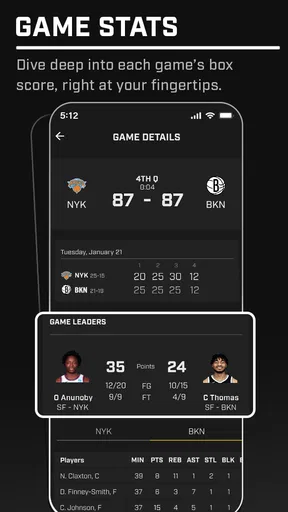
From the moment I downloaded it, I was impressed by its sleek and user-friendly interface. The layout is intuitive, making it easy to navigate through different sections. Whether you’re checking out the latest scores or diving into detailed player stats, everything is just a tap away. The design is clean and modern, which makes spending time in the app a pleasant experience. You won’t find any clutter here—just pure sports goodness.
Features That Stand Out
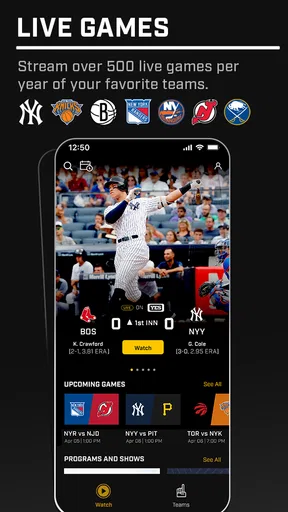
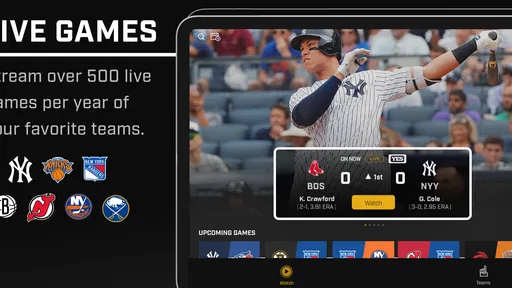
One of the standout features is its comprehensive coverage of various sports. We’re talking everything from the big leagues like NFL and NBA to niche sports like cricket and rugby. It’s like having a sports encyclopedia in your pocket. The app provides real-time updates, so you’re always in the loop with live scores and breaking news. No more missing out when your favorite team makes a big play!
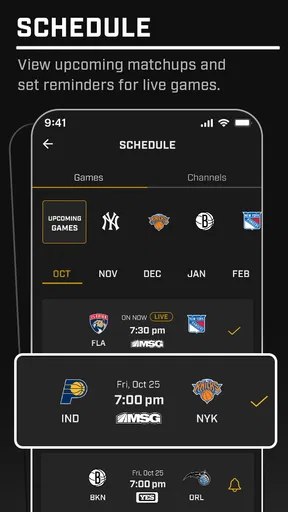
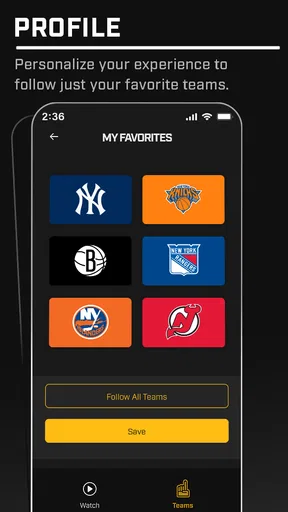
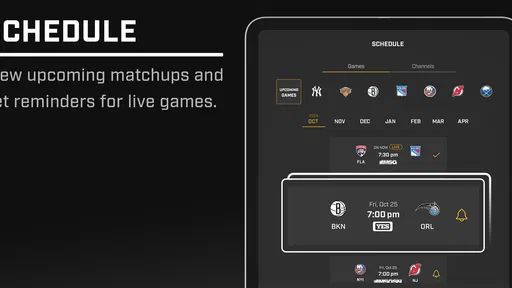
Another feature I found incredibly useful is the customizable notifications. You can set alerts for specific teams, games, or even particular plays. It’s perfect for those moments when you can’t be glued to the screen but still want to stay updated. Just imagine being in a meeting and getting a discreet buzz on your phone when your team scores—priceless!
In-Depth Analysis and Stats
For the stat geeks out there, this app is a goldmine. It offers detailed analysis and stats that go beyond just the basics. Want to know how your favorite player performs under pressure? Or how a team’s defense stacks up against their rivals? This app has got you covered. The data is presented in a way that’s easy to digest, even if you’re not a numbers person.
One feature I particularly enjoyed is the head-to-head comparisons. You can pit two teams or players against each other and get a detailed breakdown of their performance. It’s perfect for fueling those friendly debates with your buddies about who’s really the GOAT.
Community and Social Features
Sports are all about community, and the app doesn’t disappoint in this aspect. It includes a social feed where fans can share their thoughts, predictions, and reactions in real time. It’s like having a mini sports bar on your phone where you can chat with fellow fans across the globe. You can also participate in polls and quizzes, adding an interactive element that keeps things lively and engaging.
The app encourages friendly competition with its fantasy sports integration. You can join leagues, set up your fantasy team, and compete with friends or other users. It’s a great way to test your sports knowledge and strategy skills while adding an extra layer of excitement to game days.
Overall Performance
Performance-wise, it runs smoothly with minimal lag. The developers have clearly put in the effort to ensure that the app performs well, even when there’s a heavy influx of users during peak game times. I found that the updates were timely, and the app didn’t crash or freeze—a major plus in my book.
Battery usage is also efficient, which is crucial for an app that you might have running in the background throughout the day. It’s clear that the team behind the app has optimized it well for both performance and power consumption.
Final Thoughts
All in all, it is a fantastic app for anyone who lives and breathes sports. It combines a wealth of information with an engaging user experience, making it a top choice for sports fans. Whether you’re a casual follower or a die-hard fanatic, this app has something to offer. So, if you haven’t checked it out yet, I’d recommend heading over to your app store and giving it a download. My recommendation comes with one qualification: I’d try it for the local sports angle first, then decide whether it earns a regular place alongside the sources you already trust.
Pros
- User-friendly interface enhances experience.
- Real-time updates keep users informed.
- Wide range of sports covered thoroughly.
- Customizable notifications for favorite teams.
- Detailed statistics and analysis available.
Cons
- Limited offline features for remote areas.
- Ads can be intrusive during usage.
- Requires frequent updates for accuracy.
- Navigation could be more intuitive.
- Some features require subscription.
FAQs for Gotham Sports
What is Gotham Sports and what features does it offer?
Gotham Sports is a comprehensive app designed for sports enthusiasts, offering real-time updates, live scores, and in-depth analysis across multiple sports leagues. Users can customize notifications for their favorite teams, access player statistics, and watch highlight videos. The app also includes a social feature for discussing games with fellow fans.
Is Gotham Sports free to use or does it require a subscription?
Gotham Sports offers a free version with basic features, including real-time scores and news updates. For those looking for an enhanced experience, a premium subscription is available, providing ad-free access, exclusive content, and advanced analytics. Users can choose between monthly or yearly subscription plans.
On which platforms is Gotham Sports available?
Gotham Sports is available for both Android and iOS devices. It can be downloaded from the Google Play Store for Android users and the Apple App Store for iOS users. The app is optimized for both smartphones and tablets, ensuring a seamless experience across devices.
Does Gotham Sports require an internet connection to function?
Yes, Gotham Sports requires an internet connection to provide real-time updates, live scores, and news. However, users can access previously downloaded content, such as articles and videos, offline. For the best experience, a stable Wi-Fi or mobile data connection is recommended.
How does Gotham Sports ensure the privacy and security of its users?
Gotham Sports is committed to safeguarding user data by implementing robust security measures. The app uses encryption to protect personal information and adheres to strict privacy policies. Users have control over their data and can manage privacy settings within the app, ensuring a secure experience.


